Showing posts with label Free Softwares. Show all posts

Feb 10, 2014

Convert Files into any Format with Right Click using Cometdocs for Desktop

There are lots of file formats being used today, and every format has its own advantage. While we use PDF files where we wish to protect the data, we use images to capture some info. So what if you need to convert the same file you are using into some other format, you may go to the free online web services and get them converted or may be download and install a tool just for this purpose.
Meet a new tool called as Cometdocs for Desktop, and what this have in different from others is that it incorporates the converter right into the file context menu. This means, if you come across any file that needs to be converted into some other format, look nowhere, just right click on it and select the output format. The converted file will be presented to you in some time.


Cometdocs is an online file conversion site which has launched this desktop tool for Windows. While uploading large documents to convert them online can slow down your browser (thereby preventing you from working) or converting the document in the system can slow down your machine, this converter works in a different way. It still uses its old way of converting which is to upload the file from the client directly (without you doing it) and then downloading back to the machine and the same folder automatically.


Although this will use your data plan but will save the machine from getting slowed down. To be able to use this tool, you need to login into the cometdocs account which you can register for free anytime (simple email address and password is all it need).

You can convert the file into any format from the list present in the right click context menu and the conversion status can be seen in a separate window. If you think it is a really useful tool, then you can get it for free from the link below.


Scan and Find Lost Hard Disk Space with MeinPlatz

There is a thing with hard disk memory, it is not always sufficient. Whether you buy double the memory of the hard disk, you will eventually use all the memory intentionally or unknowingly. I remember upgrading my hard disk to the double of the present hard disk space but over the time, I had used that too. This is the same issue with everyone, so if you are also wondering where your memory space has gone, then do read the article.

Well most of the times we know what we are saving in our disk, but there are times when we don’t know what is being saved and stored in our disk automatically. Hence we need to continuously scan and monitor the hard disk space but doing this manually is not possible. Thus, here is a tool called as MeinPlatz that does it for you. It scans the entire hard disk for you to find out the space utilization for you and present that in a list in an easy form.


The biggest advantage of using this tool is that it eliminates the need of scanning the disk manually to find out which all files and folders are storing how much data. MeinPlatz which actually means “My Space” scans your hard drive for the memory consumption and presents the data in a tabular form which is very easy to decipher.

Using this tool you can find out right in one screen which file and folder is consuming how much data so that you can take the appropriate action. The tool also has an option of excluding the files and folders which you don’t wish to scan. Moreover MeinPlatz allows you to export your data in other formats like CSV or excel, txt and html.

The tool also lets you zoom the display, for easier viewing using the magnifier option. MeinPlatz is found to work on all versions of Windows and can be downloaded from the link below.


Sep 25, 2012

Some Cool Typing Tutors for learning Keyboard Typing

We all like typing on computer keyboards faster than others, don’t we? For someone who has started working on computers might face difficulty in typing. We know many users who type with one finger, something that takes lot of time and effort in typing.


If you wish to learn typing and don’t like to wait years in learning by use of computers, then you should definitely go for the Typing Tutors. Typing Tutors are the programs designed to make users habitual of typing and also let you know the best practises of using the keyboard. They also tell you the exact mapping of your finger with the keyboard button.

There are many typing tutors available on internet. Moreover you can also use these online and don’t need to install one on your system. Here are two tutors that I liked the most with their features:

1- Tipp 10


TIPP10 is a free touch typing tutor for Windows, Mac OS and Linux. The software is easy to use and features a clear user interface. This is one great typing tutor that anyone including children or aged people can use easily.


The tool includes intelligent practice sessions, support functions and progress trackers. You can also change the text font, color and other things to adapt it to your needs. A status bar displays the fingers that should be used and tallies errors and characters per minute.

The results displayed are also detailed and tracks your progress in a graphical manner. You can even customize the tool according to your needs.

2. Keyboard Training


This is an open source, small and free program written in VB that allows you to learn keyboard typing in a playful manner. You can choose from AZERTY and QWERTY keyboards.

When you use this program you see that you are given some seconds to press the key that is being highlighted. The game has few difficulty levels to choose from, higher the difficulty lower the time to press the keys.

This is a free tool that can help you learn keyboard typing in a playful manner.

Re-enable Services and Windows Features Disabled by Virus Instantly

If you have been working on a Windows machine for some time now, you must have come across many computer virus attacks till now. Also you might be knowing what the system status is, after each attack. There are many different kind of computer virus and malware, each having their own type of adverse effect on the computer. Even if you have successfully removed the virus from your system, your computer might be struggling.


Most of these viruses affects computer and disables many Windows programs like Folder Options, Registry Editor, cmd and other features. Even if you have removed the virus from your system, these features are disabled and need to be re-enabled back before they can be used again. But a normal computer user can’t re-enable them back as these involve complex registry operations, even there is no surety that it would get fixed.


I came across one tool that can help you in this regard called Tangosoft’s Re-Enable II (or Re-Enable 2.0). As the name of the tool suggests, this tool can re-enable many windows functionalities and services in just one single click. You just need to make sure that the virus has been removed else the changes might not take effect. Also it is worth noting that, if the changes are undone then your system still have some traces of virus left.


With one click Re-enable will repair the following windows features:

•Safe Mode
•Registry Editor
•Command console “cmd”
•System restore
•Start menu Run command
•Task manager
•Task scheduler
•Safe mode
•Right click context menu
•My computer properties
•Folder options
•Windows explorer search
•start menu search
•Reset file and folder attributes
•Ms Config
•Restore explorer registry key
•Re-enable will also edit hosts file
•Scan and delete Autorun.inf files

The tool is free to use for personal use and requires .Net Framework 3.5 or above. You can also try the portable version of Re-Enable 2 but it would be of larger size as it already contains the required .Net Framework.

Find and Delete Empty Folders on your Computer Easily

We have lots of data in our system which comprises of files and folders. A folder hierarchy can go upto many levels thereby making difficult for us to scan them for data. We also tend of have lot of empty folders in our machines, although unwillingly but we do have it.


Say for instance, you have moved some data or a file from a folder to a new location but it can happen that you forget to delete the parent folder thereby creating an empty folder adding to the system clutter. Although empty folder does not affect us but it degrades the system performance by creating disk fragmentation and adding the file clutter.

Therefore we advise you to scan your system for empty folders and delete them but if you plan to do this process manually then you are going to end up wasting lot of precious time of yours. Here is a simple tool called Fast Empty Folder Finder (FEFF) that is specifically designed for this purpose of scanning the system for empty folders up to any level of hierarchy and presenting you with a choice to delete them in one go.

FEFF is very simple to use too, you just need to download this executable file and run it to get the interface. Now you can either drag and drop the folder or specify a location to search for the empty folders. After scanning your system, it will present a list of all the empty folders before you, clicking which you can have a preview and selecting which you can either delete them temporarily or permanently.

Moreover you can also export this list as .csv or as .feff and also import the same to have a track of the folders that you have in your computer. You can stop the scan in between and also start a new scan with new set of filters to search for the empty folders.

The tool is compatible with Windows XP, Windows Vista, Windows 7 and Windows 8. You can download it from the link below.

Download Fast Empty Folder Finder

Sep 24, 2012

D7: Windows Repair Tool for Advanced Users

In our quest to make your computer problem free and so that you have a comfortable experience while using your computer, we are reviewing here one tool that can help you in solving most of your system issues. However we advise you to use this tool only if you know most things about the computer and are an Advance User unlike basic user.


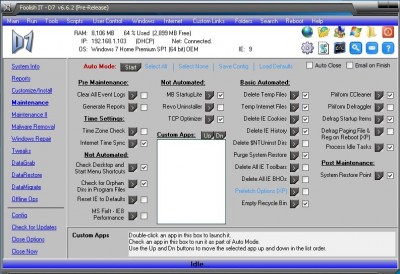
This is a not-so-simple yet powerful tool called D7 which can help you in most of the things you can do on your computer. With system maintenance, malware removal to system repair and tweaks, this tool is capable of doing lot of things. You just need to download and run this utility and see whole lot of options for yourself


As you can see there are lots of links in the program window, like System Info, Maintenance, Malware removal, Windows repair, tweaks and data restore etc. You can use any of these links. System Info link provides you with complete system information, Maintenance provides you with options like deleting temp files, updating system time, system restore etc.


There are lots of options in every link, which means you can do lot of things from this single tool only. However if you are not sure of on how to use this thing, then we will advise you to stay away from this tool as this could even make your system go worse if not used properly.

You can also go through the video on how to use the D7 tool.
http://www.youtube.com/watch?v=uDiCk3Czl8s&hl=en&hd=1

This tool is meant for experienced PC technicians only, not for basic users. If you feel that you can handle so much of options, then go ahead and download this tool.


Download

Delete Folders and Files from Any Location at Once with Deletist

Our computer has so many files and folders that we can’t even think of organizing them. In fact there are some duplicate folders and files and are consuming extra space from the hard disk which can be avoided. But organizing them is very difficult and a time consuming process. What if you decide to delete some folders, you will have to go and scan the system manually, isn’t it?


Consider a situation where you are asked to delete some folders and files placed at different locations in your system, what shall you do? Deleting these files and folders manually will take you ages (if the count is huge) and is a time wasting process. Here is a tool that can help you in this situation called as Deletist.


With the help of tool Deletist, you can delete any number of files and folders from anywhere inside the computer simultaneously without visiting the actual location. All you have to do is just feed in a text file having the location of the files and folders to be deleted, and clicking the Delete button will erase them at once.

When you drag and drop this text file on to the program window, the locations will get auto populate and in case there are some spaces in the text file, then clicking the Warning symbol (yellow triangular one) will remove all those so that the deletion process goes smooth. Moreover if you don’t want to take any risk while deleting the data, then you can select the option of “Delete to Recycle Bin” as now the files will go to Recycle Bin instead of permanent deletion.

You can use the tool on Windows and being a portable tool, it can be used in a USB drive too. Download it from the link provided below.

Add Cool Effects to your Video Chats with WebCamEffects

For those who like to travel places either for work or for leisure, communicating with the dear ones can be bit difficult and expensive. The best thing that comes to our rescue here is the video chat which is the cheapest way to communicate to anyone and anywhere. You can make use of any video chat tool like Skype, Google Video, Facebook video chat etc for this purpose.

Moreover if you are video chatting with someone you would not like them to see the cluttered background at your place (this goes especially for the bachelors) . Also if you feel that video chat is bit boring and want to add some cool effects to the way you look, then you can do that using a tool called WebCamEffects.


WebCamEffects is a free tool that has lots and lots of effects to choose from, from the UI menu. You can select any effect, add it your chat screen and customize the way you look to the other person. Moreover the tool also allows you to record and save the video chat session, and you can also either upload it youtube directly or just save it on your hard disk.

You can customize your chat screen for color, contrast, brightness and other normal features of course but apart from these you can change whole of your look and also the background. With the presets present by default, you can select any preset and change your look completely (as shown in the screenshot).

The application is more of a fun application that can add some cool effects to your chat so that you don’t feel bored again while chatting with some friend of yours. The app is free and is supported on Windows XP, Vista, 7 and 8.

WEBCAM EFFECTS


May 8, 2012

Earth MKV Converter v1.0 Portable

Earth MKV Converter v1.0 Portable | 18 Mb

A powerful tool that not only can convert any video files to MKV, but also can convert MKV to popular video formats (AVI, MPG, XVID, H264, MOV, QT, WMV, ASF, FLV, DAT, VOB, RMVB, RM, MP4, MKV, OGM, etc.).

Features:


Earth MKV converter is not only able to convert video files in all formats into MKV but also convert MKV video files into all popular formats. For example, you can convert MKV to 3GP video format or convert mkv to dvd format. Earth MKV converter can do all video conversions from or to MKV. While the image quality is high, the conversion speed is very fast (up to 600%).

With the integrated video player, you can convert only the outstanding part of the video by setting up the start time and end time after preview. When you need to convert video files but have to leave the computer, there is no worry about this because Earth MKV converter?s auto shutdown function will automatically shut down your computer when the conversion is complete.

With Earth MKV converter's cute and easy-to-use interface, you will have a good mood when you are at work. You can quickly master it without any previous study. Download and try it now, the best choice you?ve ever had

Fast and easy to use interface
Support batch conversion with a task list
Convert among all popular video formats: AVI, MPG, XVID, H264, MOV, QT, WMV, ASF, FLV, DAT, VOB, RMVB, RM, MP4, MKV, OGM and other popular video formats are supported by the software.

Publisher's description;

EditByBSEditor: Earth MKV Converter is not only able to convert video files in all formats into MKV but also convert MKV video files into all popular formats. For example, you can convert MKV to 3GP video format or convert mkv to dvd format. Earth MKV converter can do all video conversions from or to MKV. While the image quality is high, the conversion speed is very fast (up to 600%).

With the integrated video player, you can convert only the outstanding part of the video by setting up the start time and end time after preview. When you need to convert video files but have to leave the computer, there is no worry about this because Earth MKV converter's Auto ShutDown function will automatically shut down your computer when the conversion is complete

Key features in Earth DVD Ripper:

Convert among all popular video formats: AVI, MPG, XVID, H264, MOV, QT, WMV, ASF, FLV, DAT, VOB, RMVB, RM, MP4, MKV, OGM and other popular video formats are supported by the software.;
Support any video movies .
Automatically fast jump the movie menus extras to main movie.
Selectable video title, dvd audio track, subtitle , and set recording beginning point
Convert a segment of the movie you wanted by appointing specifies start and end position.
Excellent image and luxuriant sound are provided;
Automatically shutdown after conversion finished. you can free download Earth MKV Converter 1.00 now.


Windows XP Drivers (32-64bit) 2011 Rus/Eng


A collection of updated drivers for devices running the operating system Windows XP x32/x64, is a most complete and fresh set on 25/12/2011 in this release contains the driver for Stationary (Desktop) and Laptop (Notebook) All drivers are sorted by device and packed in a self extracting archive 7 zip, all drivers were downloaded from the official websites of manufacturers and are the reference (without external changes.)

The list of drivers

(Audio)
* Analog Devices SoundMAX HD Audio Windows XP Driver analog-device hd v.6.10.1.7270 - x32/x64

* Analog Devices SoundMAX AC'97 v.5.12.01.5410 - x32/x64

* Realtek HD Audio Driver R2.66 - x32/x64

* Realtek AC97 Audio Driver v4.06 - x32/x64

* Realtek HDMI Audio Driver R2.39 - x32/x64

* C-Media CM-102 Driver v.5.12.8.2118 - x32/x64

* C-Media CM106 v.2131-2111 - x32/x64

* C-Media CM6501 v.6.12.8.2151 - x32/x64

* C-Media CM8738 v.8.17.34-x32/x64

* C-Media CM8768 v.8.17.33-x32/x64

* C-Media CM8770 v.8.17.33-x32/x64

* C-Media CM8787 v.8.17.47-x32/x64

* C-Media CM8788 v.6.12.8.1772 - x32/x64

* C-Media CMI9880L Driver v.5.12.01.0008 - x32

* C-Media CMI9880L Driver v.5.12.1.9 - x64

* Conexant Hermosa HD Audio Windows XP Driver v.4.36.6.0 - x32/x64

* Conexant HD Audio Driver v.3.73.0.50 - x32/x64

* Conexant Cocoa II HD Audio Driver v.3.80.0.51 - x32/x64
* SigmaTel Audio STAC92xx Driver v.6.10.6207.2 - x32/x64
* VIA HD Audio Driver v.6.0.01.9800c - x32/x64

(Video)


* AMD / ATI Catalyst 11.12 Desktop WHQL x32

* AMD / ATI Catalyst 11.12 Desktop WHQL x64

* AMD / ATI Catalyst 9.3 Notebook WHQL x32

* Intel Graphics Driver

- V.14.38.3 - x32/x64

* Intel Graphics Driver (B43, G41, G43, G45, Q43, Q45, GL40, GM45, GS45, GS40) - v.14.42.11 - x32/x64

* Intel Graphics Media Accelerator v.14.46.8 - x32/x64

* Nvidia 285.58 Desktop WHQL - x32

* Nvidia 285.58 Desktop WHQL - x64

* Nvidia 266.58 Notebook WHQL - x32
* Nvidia 266.58 Notebook WHQL - x64
* VIA CN896 VIA Chrome9 , P4M900 VIA Chrome9 , VN896 VIA Chrome9 HC v.20.50.01a - x32/x64
* VIA VX800 VIA Chrome9 HC, VX820/UT VIA Chrome9 HC v.20.12.01a - x32/x64
* VIA VX855 VIA Chrome9 HCM, VX875 VIA Chrome9 HCM v.24.10.01q - x32/x64
* SiS Video Driver UniVGA v.3.93 - x32/x64


(Chipset)


* Intel Chipset Driver v.9.2.3.1022 - x32/x64

* Intel AMT / MEI / HECI Driver v.7.0.2.1164 - x32/x64
* Intel Management Engine Interface Driver v.7.1.14.1107 - x32/64
* NVIDIA nForce Windows 7 Driver v.15.45 - x32
* NVIDIA nForce Windows 7 Driver v.15.45 - x64
* VIA Hyperion Chipset Driver 5.24a - x32/x64

LAN (Network)

* Atheros (AR8121/AR8113/AR8114/AR8131/AR8132) v.1.0.0.49 - x32/x64
* Atheros (AR813x, AR815x) Driver v.2.0.4.4 - x32/x64
* Atheros (L1 Gigabit Ethernet 10/100/1000 Base-T Controller) v.2.4.7.14 - x32/x64
* Broadcom BCM57xx Ethernet Driver v.14.8.0.5 - x32/x64
* Intel PRO/10/1000 (PRO/10GbE) Ethernet Driver v.16.7 - x32/x64
* JMicron 2xx Ethernet Driver v.6.0.33.3 - x32/x64
* Marvell Yukon Gigabit Ethernet Driver v.11.45.1.3 - x32/x64
* Realtek Ethernet Windows XP Driver v.5.790.0916 - x32/x64
* VIA Rhine Ethernet Driver v.3.87a - x32/x64
* VIA Velocity Ethernet Driver v.1.71a - x32/x64

(Card Reader)


* Alcor Micro Card Reader Driver v.1.7.16.0 - x32/x64
* JMicron JMB38x Driver v.1.00.63 - x32/x64
* O2Micro Memory Stick Reader Driver (OZ6933, OZ711E0, OZ711EC1, OZ711E1, OZ711E2, OZ711M1, OZ711M2, OZ711M3) - v.3.19.1 - x32/x64
* Realtek (RTS five thousand one hundred twenty-one, 5101, 5111, 5116 Card Reader) v.6.1.7600.30127 - x32/x64
* Realtek (RTS five thousand one hundred and fifty-eight Card Reader) v.6.0.6000.83 - x32/x64
* Realtek (RTS five thousand one hundred and fifty-nine Card Reader) v.6.0.6000.20136 - x32/x64
* Realtek (RTS 5 208 Card Reader) v.6.1.7601.85 - x32/x64
* Realtek (RTS 5139 Card Reader) v.6.1.7600.10001 - x32/x64
* Ricoh R5C83x/84x Driver v.2.14.00.05 - x32/x64
* Ricoh R5U23x/24x Driver v.2.15.17.02 - x32/x64

(Wi-Fi)

* Atheros AR50XX Wireless Windows 7 Driver v.9.2.0.427 - x32/x64
* Broadcom Wireless BCM43xx Windows 7 Driver v.5.100.9.142-x32/x64
* Intel Wi-Fi Windows XP Driver v.14.2.0.10 - x32/x64
* Realtek RTL8187S, RTL8191SE Wireless LAN v.6.9110 - x32/x64
* Realtek RTL8180, RTL8185 Wireless LAN v 6.1122.1016. - X32/x64
* Realtek RTL8187B Wireless LAN v.6.1163.62.1182 - x32/x64
* Realtek RTL8187L Wireless LAN v.5.1313 - x32/x64
* Realtek RTL8190, RTL8192E Wireless LAN v.6.1682.0.1222 - x32/x64
* Realtek RTL8191SE, RTL8192SE Wireless LAN v.1094.3.0819 - x32/x64
* Realtek RTL8192CE, RTL8191CE, RTL8188CE Driver v.1005.28.1006 - x32/64
* Realtek RTL81xxSU, RTL8712 Driver v.1084.44.1104 - x32/x64
* Realtek RTL8188CU, RTL8192CU Driver v.1012.1.1231 - x32/x64

System requirements:

OS: Windows XP

CPU: Pentium 1.5 Ghz

VIDEO: Video card capable of 32bit at 640x480

RAM: 512 Mb


Download :

http://extabit.com/file/2dvlozvssd2vj/Windows.XP.Drivers.x32x64.2011.RusEng.part1.rar
http://extabit.com/file/2dvlozvssd2vz/Windows.XP.Drivers.x32x64.2011.RusEng.part2.rar
http://extabit.com/file/2dvlozvsw3nxb/Windows.XP.Drivers.x32x64.2011.RusEng.part3.rar
http://extabit.com/file/2dvlozvsw3efj/Windows.XP.Drivers.x32x64.2011.RusEng.part4.rar
http://extabit.com/file/2dvlozvssd2wv/Windows.XP.Drivers.x32x64.2011.RusEng.part5.rar

OR
 http://ul.to/yevyr7fs/Windows.XP.Drivers.x32x64.2011.RusEng.part2.rar
http://ul.to/e65id261/Windows.XP.Drivers.x32x64.2011.RusEng.part1.rar
http://ul.to/ch7kx6zz/Windows.XP.Drivers.x32x64.2011.RusEng.part3.rar
http://ul.to/k88d4qtz/Windows.XP.Drivers.x32x64.2011.RusEng.part4.rar
http://ul.to/emzg6h84/Windows.XP.Drivers.x32x64.2011.RusEng.part5.rar


Jul 1, 2010

Nature Illusion Studio Pro 3.41.3.86


"Transform your real-world photo into an animated nature scene by adding a wide array of water, weather and sound effects to your own photos and images"

Make photo live
A photo restricts your excitement from holidays spent at the seaside or near a waterfall to flat, two-dimensional images. Nature Illusion Studio lets you go beyond these physical restrictions and make a self-made animated scene, which can bring the original spirit and excitement of the holiday back to life.

Realistic natural effects
All visual effects have been recreated with accurate physics, so ripples on the water or subtle movements of the air look and behave just like they might in the physical life.


Share to others
The best thing is that you can share your excitement with others. You can create a screensaver and present it as a gift to your beloved or friend, publish it on your website and let your guests or customers download it for free.

An important benefit of Nature Illusion Studio is the option to share the exciting and happy moment in the more realistic manner as opposed to the traditional two dimensional photos

Superb result
The end result is a superbly lifelike and atmospheric presentation that can be saved as a screensaver, a standalone executable, an AVI or animated GIF file and distributed to other people, who can admire your creation.

Features:

* Apply up to 6 types of water effects to a single image.
* Add Animated Objects to image. Supports animated GIF. ** NEW **
* Add snow or rain.
* Add sound effects up to 8 channels.
* A library of water presets for various effects, including Waterfall, Lake, River, Fire, Fog, etc.
* Auto View mode provides you with instant feedback on your changes in real time.
* Save your creation as a screensaver, executable file, GIF or AVI file.
* Created nature scenes can be used in Water Illusion Screensaver, or Ace Pro Screensaver Creator
* Works with Windows Vista, XP, 2000, ME, NT, 98, 95


Nov 27, 2009

Disable Autorun.inf Creation in USB Pen Drives


Autorun.inf is the popular file created by the viruses in the USB Flash drives which is used by them to spread across different storage media.

It is the first file that gets created in the pen drives as soon as the drive is inserted in the system having viruses. Thus it is for sure that if you prevent the creation of this file in the USB drives then the virus will not spread on its own.

Now to achieve this task here is a tool developed by OPS called Autorun Spreading Breaker. This tool helps to protect our external drives from the autorun file and thereby prevents computer to computer spread of the viruses.

The tool is free and is easy to use.


How To Disable a USB Flash Drive (Mass Storage Devices Only)

Whenever you insert a USB flash drive into your computer, the flash drive is detected automatically by Windows and then opened. Here I am go...